

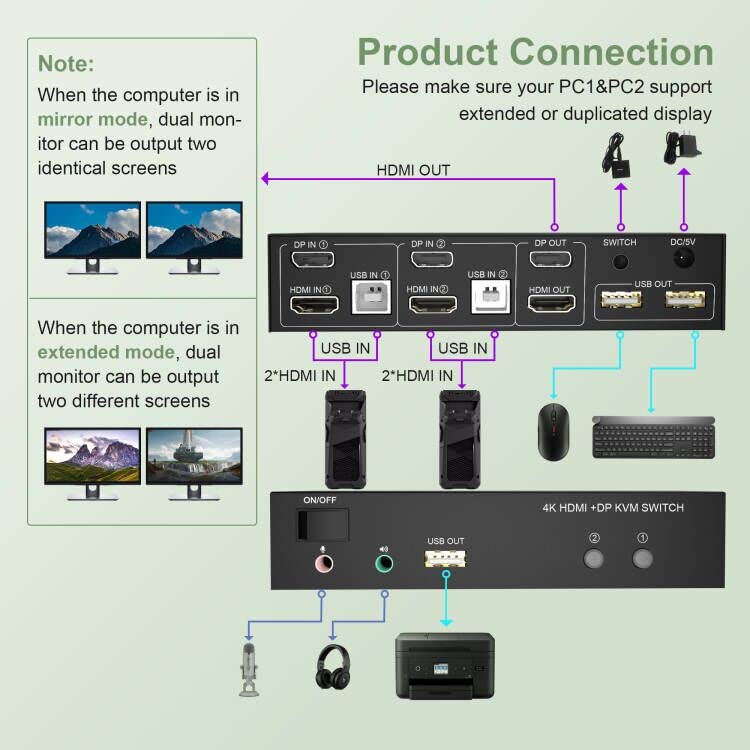


Description
Upgraded Version Dual Monitor KVM Switch DisplayPort HDMI 2 Port 4K@60Hz
Product Features:
No complicated installation is required, and non-professionals can easily operate it.
The ports that need to plug in HDMI/DP/USB cables are all hidden behind the KVM, so the desktop doesn’t get cluttered.
Dual monitors output support up to 4K@60Hz for extended,mirrored or spliced display
Switching modes: Buttons on the front panel and wired remote
With extra 3 USB 2.0 and Audio Microphone output.
installation steps:
1. Insert the adapter into the KVM switch;
2. Plug the Displayport cable and HDMI cable into the KVM switch and monitor;(Output)
3. Plug the Displayport cable, HDMI cable and USB cable into the KVM switch and your computer/laptop (HDMI and DP cables are not included)(Input)
Please check whether HDMI IN1, DP IN1 and USB IN1 are corresponding, and whether HDMI IN2, DP IN2 and USB IN2 are corresponding. Mixed insertion is not supported.
HDMI IN1 + DP IN1 + USB IN1=PC1
HDMI IN2 + DP IN2 + USB IN2=PC2
4. Insert the mouse and keyboard into the KVM switch;
5. If necessary, plug the headset or microphone into the KVM switch;
6. Start the computer/laptop.
Note:
1. If the KVM switch does not work, you can turn off the switch on the panel and turn it on again after 2-3 seconds, and it will return to normal.
What’s in the Box:
Dual Monitor DisplayPort HDMI KVM Switch x1
5V Power Supply x1
USB Cable x1
Wired Switching Button x1
User Manual x1