
Dual Monitor KVM Switch DisplayPort HDMI 4K@60Hz 2 in 2 Out KVM Switch 2 Monitors 2 Computers,3 USB 2.0 and Audio Microphone Output 2 USB Cables and 1 Controller

$0.00

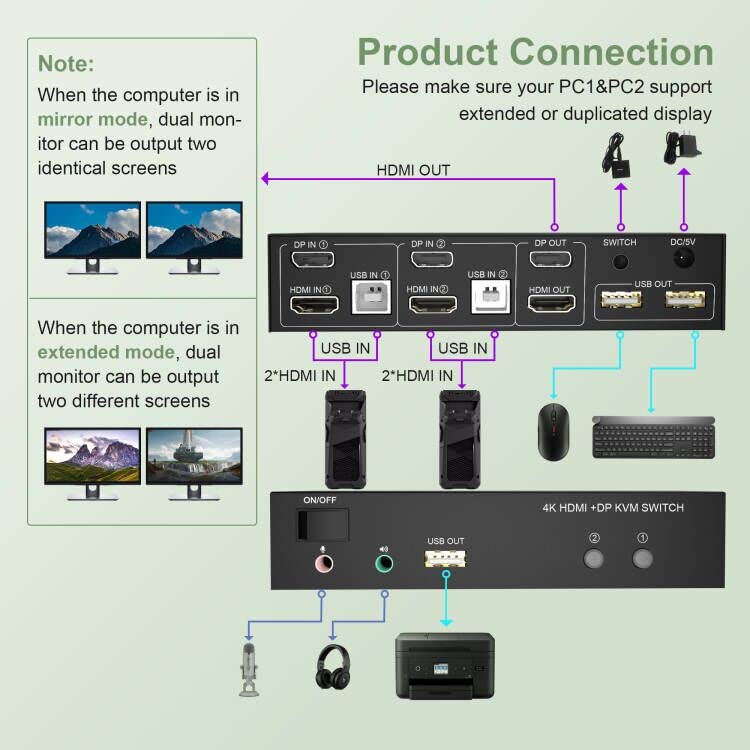
  • 【Dual Monitor KVM Switch】The Dual Monitor KVM Switch using only 1 set of keyboard, mouse and 2 monitors to control 2 DisplayPort + HDMI computers/laptops, support display one computer’s main and extended desktop (It requires every computer support 2 screen or above display functions and must support extended display).
  • 【4K@60Hz Resolution】The KVM Switch max resolution up to 4K@60Hz, compatible 3840×2160@30Hz, 1080P, 1080P 3D, 1080I, 720P, 576P, 576I, 480P, 480I. (Tips 1: it is DP1.2 60Hz version for Displayport port, it doesn’t compatible DP1.4 version, 100Hz, 120Hz, 144Hz devices. Tips 2: Only when both your computer Graphics card and monitor support 4K@60Hz then you can get 4K@60Hz effect.)
  • 【KVM HDMI Switch With 3 USB 2.0 HUB】Plug and play with no driver needed, with extra USB 2.0 port for sharing USB printers, scanners and jump drives, wireless and gaming keyboard mouse. The upgraded design hides the messy cables at the back, leaving a USB 2.0 port on the front for inserting a USB flash drive more demands at work, no need to worry about connecting office equipment.
  • 【Two Switching Methods and Wide Compatibility】1. Toggle selection on front panel; 2. Wired remote switch. Compatible with a variety of computer systems,such as Windows 11/10/7/2000 / XP / Vista,Linux,Unix,Mac,Ubuntu,Fedora,etc.
  • 【Package & Warranty】1x HDMI DP Dual Monitor KVM Switch, 2x USB Cables, 1x Power Adapter, 1x Wired Button Switch, 1x User’s manual; We provide 18 months warranty and lifetime technical support for this HDMI DP KVM Switch. Any problem, please contact us to solve. Thank you!

Out of stock

  • International Express shipping available
  • 30 day easy returns
Guaranteed Safe Checkout

Description

Upgraded Version Dual Monitor KVM Switch DisplayPort HDMI 2 Port 4K@60Hz
Product Features:
No complicated installation is required, and non-professionals can easily operate it.
The ports that need to plug in HDMI/DP/USB cables are all hidden behind the KVM, so the desktop doesn’t get cluttered.
Dual monitors output support up to 4K@60Hz for extended,mirrored or spliced display
Switching modes: Buttons on the front panel and wired remote
With extra 3 USB 2.0 and  Audio Microphone output.
installation steps:
1. Insert the adapter into the KVM switch;
2. Plug the Displayport cable and HDMI cable into the KVM switch and monitor;(Output)
3. Plug the Displayport cable, HDMI cable and USB cable into the KVM switch and your computer/laptop (HDMI and DP cables are not included)(Input)
Please check whether HDMI IN1, DP IN1 and USB IN1 are corresponding, and whether HDMI IN2, DP IN2 and USB IN2 are corresponding. Mixed insertion is not supported.
HDMI IN1 + DP IN1 + USB IN1=PC1
HDMI IN2 + DP IN2 + USB IN2=PC2
4. Insert the mouse and keyboard into the KVM switch;
5. If necessary, plug the headset or microphone into the KVM switch;
6. Start the computer/laptop.
Note:
1. If the KVM switch does not work, you can turn off the switch on the panel and turn it on again after 2-3 seconds, and it will return to normal.
What’s in the Box:
Dual Monitor DisplayPort HDMI KVM Switch x1
5V Power Supply x1
USB Cable x1
Wired Switching Button x1
User Manual x1

Additional information

Weight 0.56 kg
brand

Yeemie Pro

dimensions

‎23.3 x 17.3 x 5.7 cm; 560 Grams